Insights help managers identify the most important patterns and make the results easier to understand.
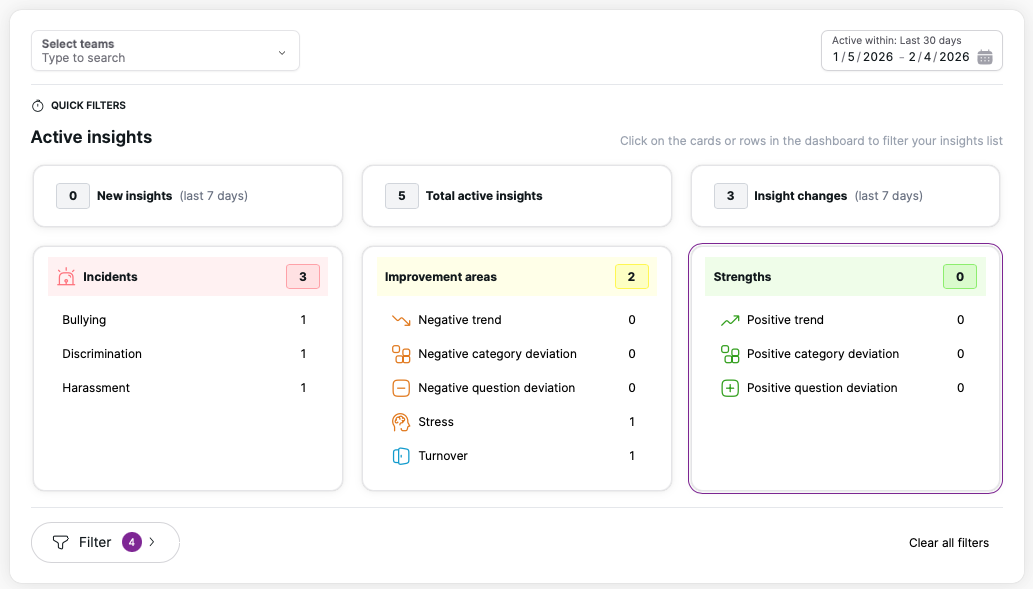
There are three different types of insights in Winningtemp:
- Strengths - Strengths highlight what is working well in the organisation. Review the Strengths insight card to understand where your team is thriving. Make sure to bring these points into team meetings to reinforce positive progress and celebrate what’s going well.
- Improvement areas - Improvement areas show areas where additional focus or action is needed to raise the temperature. Use these insights to guide conversations and decide where adjustments or support may be required.
- Incidents - The Incidents section highlights serious issues reported in the surveys, such as bullying, discrimination, and harassment. These insights alert managers to potential risks to team wellbeing, enabling them to take timely, appropriate action while maintaining confidentiality.
Get started
- Start by selecting one or several teams using the teams filter.
- Then choose the timeframe you want to analyse.
- The Quick filters section provides a snapshot of your team’s current well-being and engagement. It highlights what has changed, what needs attention, and what is going well — all based on recent survey data.
- All cards and rows in the Quick filters section are clickable, allowing you to explore more detailed information about each insight or insight type.
- You can also click the Filter button to further refine the insights.
Turn insights into meaningful actions
Insights only create value when they lead to real improvement. Once you’ve reviewed the data, decide which actions will help your team the most, whether that means starting a conversation, offering support, adjusting workloads, or celebrating progress.
Acting on insights builds trust, strengthens wellbeing, and shows your team that their feedback truly matters.
Why was my insight closed?
An insight remains active only as long as its criteria are met. If the criteria are no longer met, or if 90 days have passed, the insight closes automatically. You can still view closed insights using the filter option